Customer Support : 020-61923200, [email protected] | Call and Trade : 020-61923220

Super bricks Momentum Strategy
Super bricks Momentum Strategy
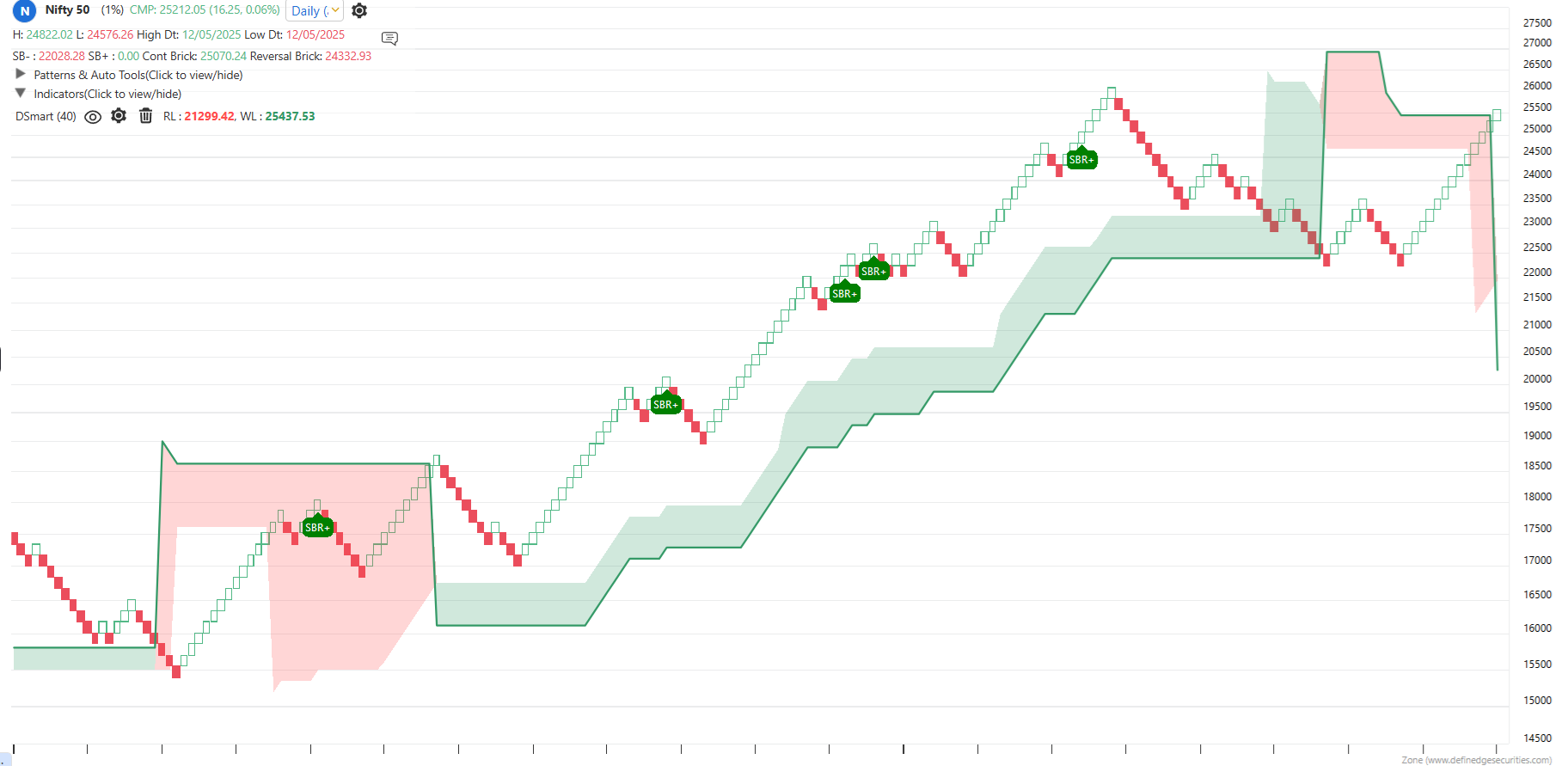
Super Bricks in Renko charts are a combination of One-back and Two-back trading patterns.
It is a powerful momentum trading approach based on Renko chart patterns.
Below is a possible Super Bricks Momentum strategy in the Momentify Trading setup.
Strategy Name: Super Bricks Momentum Strategy
Stock Group: Your choice
Allocation: Your choice
Number of Stocks: Your choice
Rank Criteria: Return Percent or Volar
Position Size: Fixed
Ranking Period: 20
Retracement: Within 30% of 52-week high
Moving Average Filter: 200-EMA
TMA Trend: Bullish 20, 50, 100 triple moving averages trend
Trend Quality: Above 50%
Relative Strength: Above 40-brick D Smart
Entry Condition: Bullish Super Bricks above D Smart
Exit Condition: Below D Smart
Market Trend Filter: Change the exit strategy to Bearish Swing breakout when Nifty turns bearish, or when X% breadth rises above 75, or X% breadth falls below its moving average.
Please note: When using Renko charts, the brick-value can be defined based on the stock universe:
- 0.50% x 3 for large-cap stocks
- 1% x 3 for other stocks
- 3% x 3 for medium- to long-term trading setups
You can run this strategy on large-cap, mid-cap, small-cap, micro-cap, or the entire market universe. It can also be applied to various sectors, thematic indices, or even your own custom group of stocks.
In the above template, position sizing is kept as fixed. However, you can also opt for ATR-based or Risk-based position sizing methods.
It is important to understand that the above rules are meant to help you understand the structure of the template. You are encouraged to tweak the parameters as per your comfort, and backtest across different time periods and stock universes to build your own customized trading template.
You can customize the exit strategy — including setting your preferred stop-loss percentage and target levels.
You can use this base template, make necessary adjustments, and save it in your Momentify Trading dashboard.
To backtest your strategy, go to:
RZone → Backtesting → Momentum Trading Backtesting
The above strategy in the Momentify Trading Setup is a long-only (buy-only) strategy and can be applied across any market segment — cash or derivatives, across any timeframe or instrument.
In Momentify trading setups, there are two options: Fresh and Running.
- Running: Displays stocks that qualified earlier and are still running in the same column. These stocks are ranked based on the selected ranking criteria.
- Fresh: Shows only those stocks that qualify the setup on the current day, also ranked based on the selected criteria.
The stock basket in Momentify is generated based on the previous session’s closing price.
To scan stocks using live market prices, simply click the Scan button.