Customer Support : 020-61923200, [email protected] | Call and Trade : 020-61923220

New Feature Releases in MF Zone
27th Feb 2026
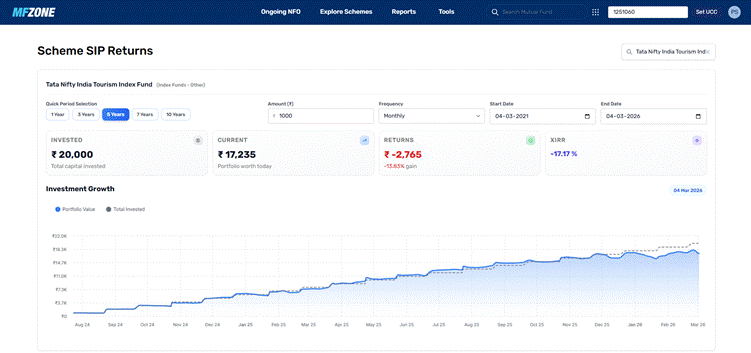
1. Historical SIP Returns Calculator
12th Dec 2025:
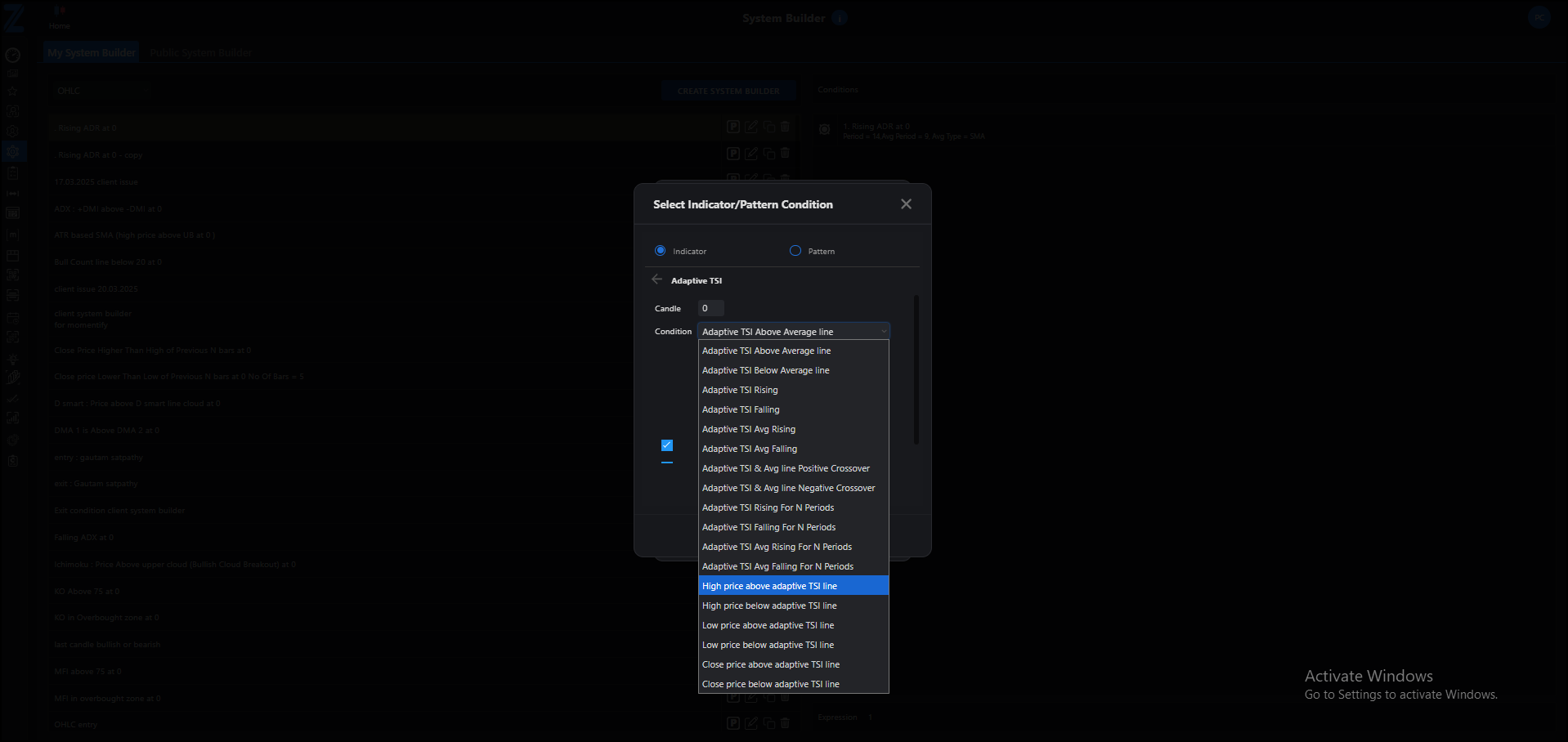
1.Adaptive TSI system builder condition for all chart
- High price above Adaptive TSI line
- High price below Adaptive TSI line
- Close price above Adaptive TSI line
- Close price below Adaptive TSI line
- Low price above Adaptive TSI line
- Low price below Adaptive TSI line
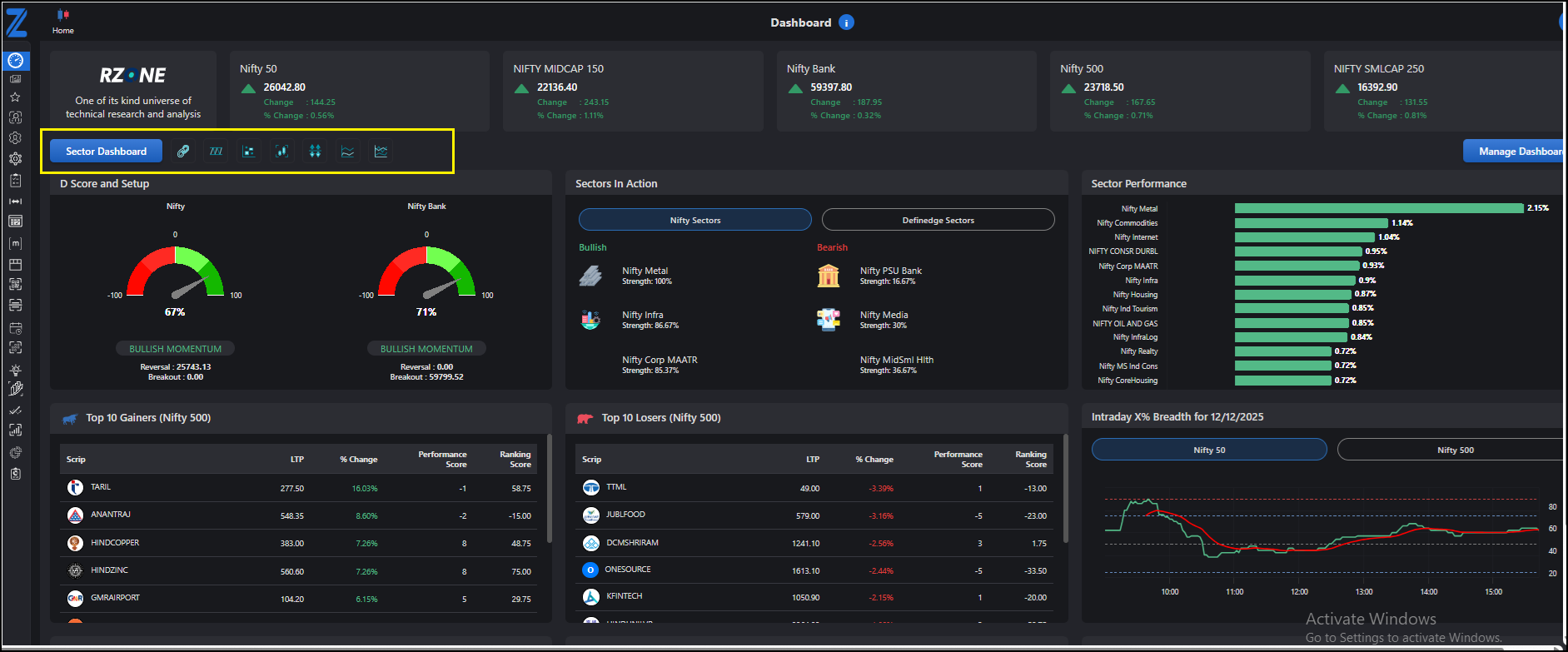
2. Sector Dashboard Enhancement
- Option Chain
- 52-Week High/Low
- Heatmap
- Open High/Low
- Breadth Movers
- Multi-Stock Performance
- Multi-Ratio Performance
10th Dec 2025:
Top Fund Managers (Tools -> Top Fund Managers):
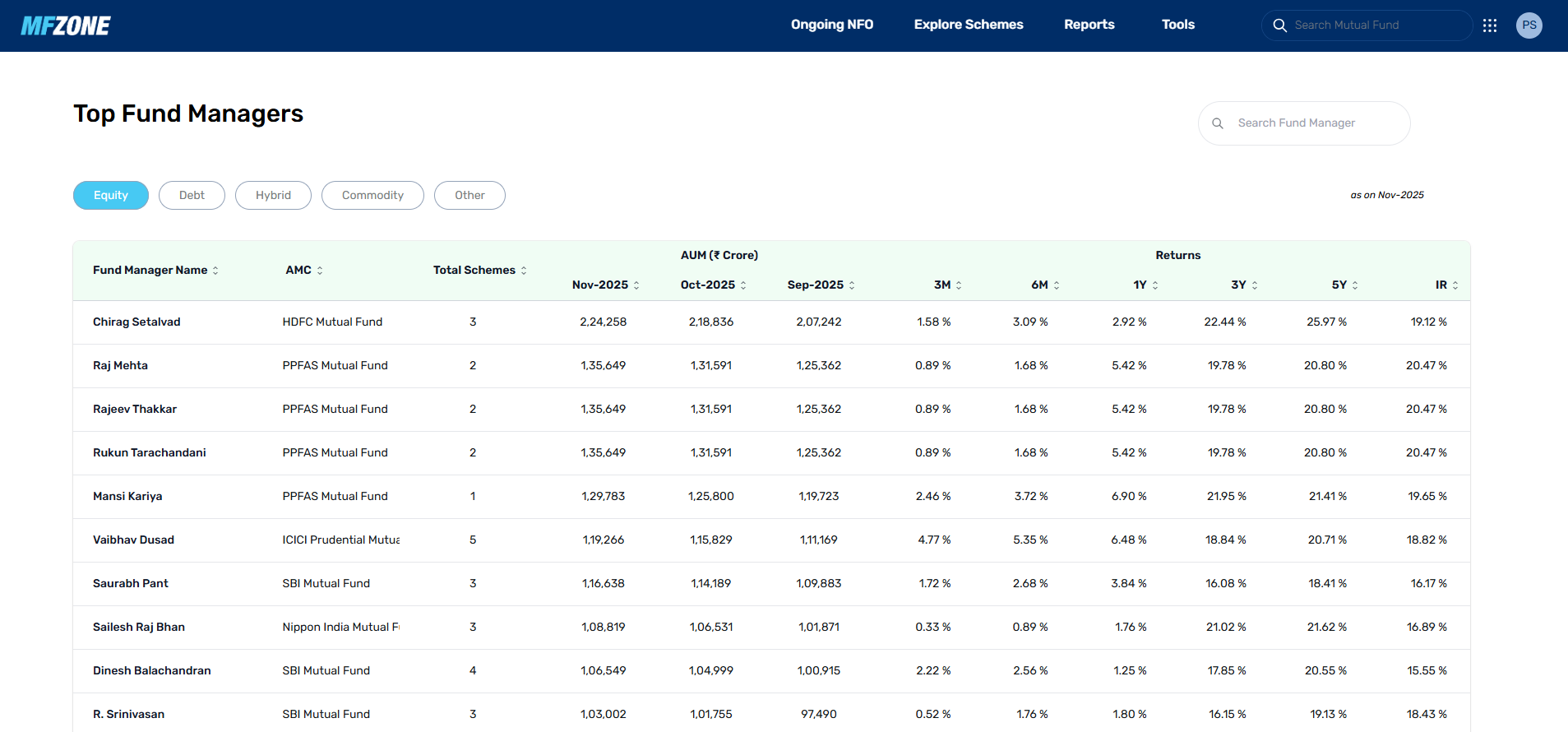
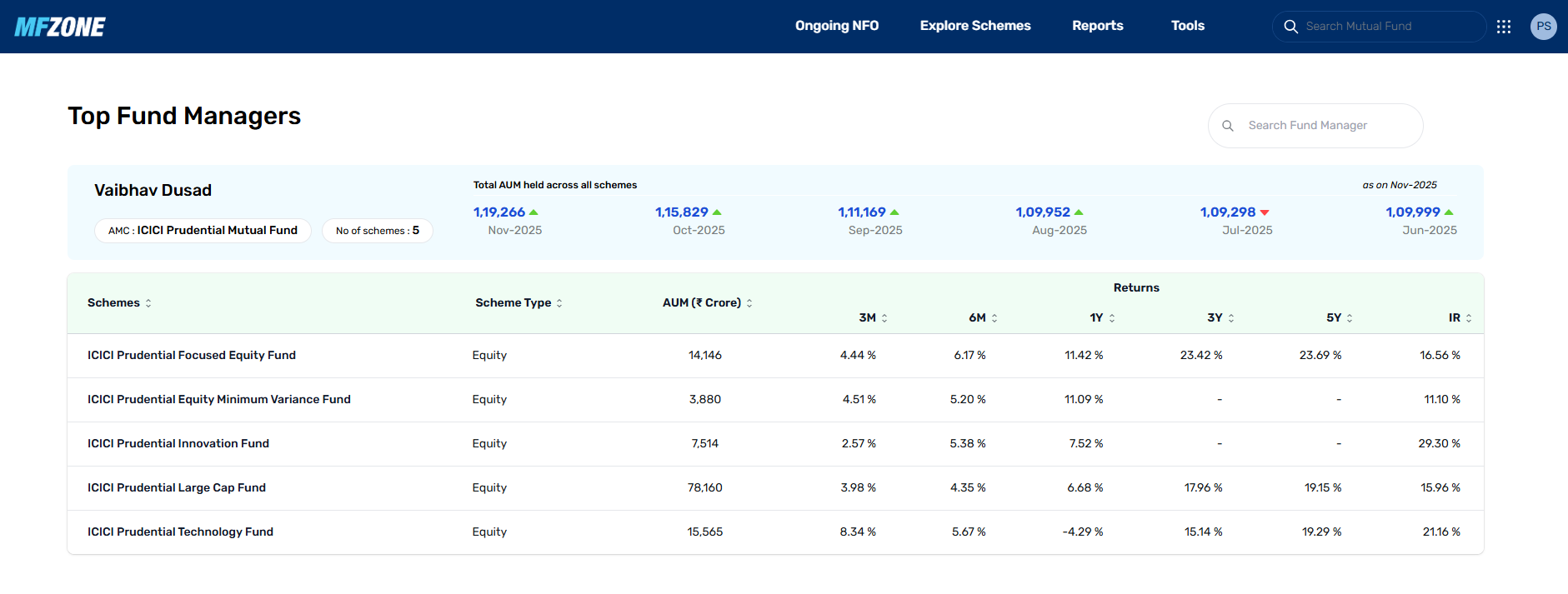
This tool gives you a clear view of all fund managers, the number of schemes they handle, the total AUM they manage over the past three months, and a complete return comparison across 3 months, 6 months, 1 year, 3 years, 5 years, and since inception for their scheme
You can sort any column to rearrange the data as per your preference. You can also filter fund managers by category such as Equity, Debt, Hybrid, Commodity, or Others.
In addition, the search option allows you to look up any specific fund manager and view all their schemes and performance details on a single page.
19th June 2025:
1. New Parameters in MF Scanner
You can now filter mutual fund schemes based on their allocation to International and Domestic equities. This helps you find schemes with the right global or India-focused exposure, as per your investment preference.

2. Improved Portfolio Tab
The portfolio tab has been upgraded to show a detailed breakdown of a scheme’s holdings. You can now view the count and weightage of Domestic equities, International equities, Commercial Papers, Certificates of Deposit, Cash, and Stock Futures (derivatives), all in one place.

15th January 2025: Commonly Held Stocks
This tool helps you identify stocks that are most commonly held across all mutual fund schemes. You can analyse this data in three formats:
This feature helps you understand which stocks are widely favoured by mutual funds.

3rd December 2024: Scheme Portfolio Overlap
Compare multiple mutual fund schemes to check how much their portfolios overlap. The tool provides the percentage of common stocks and the percentage of AUM that overlaps between the selected schemes. This helps you assess diversification and avoid overexposure to the same companies across different funds.


21st October 2024: Sectors in Action
Similar to our proprietary Stocks in Action tool, this feature analyses which sectors saw the most buying or selling in the past month across the mutual fund industry. It aggregates mutual fund activity at the sector level, helping you spot trends in fund manager allocations and sectoral momentum.

17th September 2024: MF Scanners
This powerful filtering tool allows you to filter mutual fund schemes based on over 10 key parameters and mutual fund ratios. You can apply various filters to refine your search and find funds that best align with your investment strategy. This tool makes scheme selection more data-driven and efficient.

1st August 2024: Added the "Groups"
In our latest release , we have added the Groups functionality, a highly requested feature by many of our users. This new addition allows you to save and manage stock groups across various tools. The Groups functionality is now available in the following tabs:
With this update, you can also use the saved stock groups seamlessly in RZone and Radar

12th June 2024: AMC wise Equity Portfolio:
Now, in MFZone, you get the AMC wise Equity Portfolio feature. This new addition offers you a detailed look at AMC's equity holdings and activities. You can now view the Equity AUM and the number of companies held by each AMC at a glance.
By selecting a specific AMC, you can explore comprehensive data on stocks bought and sold over the last six months. This includes details such as the quantity of shares, the percentage company bought or sold and the current market value of the company bought/sold by that AMC.
This section helps you with a better understanding of AMC's vision and sector preferences, aligning you with market trends and institutional movements.
Path: Tools -> AMC Wise Equity Portfolio

9th April 2024: Finding Mutual Fund Stock Picks
Introducing the new "Stocks Action" tab in MFZone! This section provides you with comprehensive data of the stocks bought and sold by Fund houses, enhancing your ability to find in-demand high-volume stocks. Here you will get a curated list of stocks that can be sorted based on market cap for easier analysis. By clicking on any company, you can view detailed information, including the list of fund houses that have bought/sold stocks of the selected company and access historical data too. The data can be classified based on metrics such as "% of AUM", "Number of shares" and "% of company", with the "Show Fund House/AMC wise" checkbox allowing you to avoid clutter.

30th November 2023: Explore Mutual Fund Schemes Sorted by Categories
We have enhanced the Mutual Fund section by introducing a sorting feature based on categories. Now you can easily explore and compare Mutual Fund Schemes within specific categories, making it simpler to identify investment opportunities that align with your financial goals.

30th November 2023: Scheme Report Upgraded
With the upgraded Scheme Report, you can take your investment analysis to the next level. Now you get detailed analysis of Mutual Fund Schemes, including comprehensive metrics such as Ratios, Returns, Peers, Holdings, and more.

30th November 2023: Top Performing Mutual Funds
Introducing Top Performing Mutual Funds. With this addition, users can explore a carefully curated selection of top performing mutual funds that have consistently demonstrated strong returns in the past. What makes this feature even more user friendly is the introduction of categorised listings. Whether you are interested in small, mid, flexi or other, finding the right fund has never been more intuitive.

4th November 2023: Explore Schemes
Now, you can easily explore various Mutual Funds categorised based on different fund categories. Whether you are looking for Equity Funds, Debt Funds or Hybrid Funds, the Explore Schemes feature provides a quick and easy way to find and evaluate Mutual Funds.

4th November 2023: Ongoing NFO
We have simplified the process of investing in NFOs with the introduction of the Ongoing NFO tab. You can now apply for NFOs directly from MF Zone, eliminating the need for multiple platforms. Stay updated on the latest investment opportunities and seamlessly participate in ongoing NFOs to diversify your investment portfolio.

17th June 2023: Buy and Redeem Mutual Funds
With the latest update you can buy and redeem Mutual Funds directly from MF Zone. Whether you prefer SIPs or lumpsum investments, the platform now allows you to manage your Mutual Fund transactions effortlessly.

15th May 2023: List of the key features of MFZone


With MFZone, you have all these features at your fingertips to make smarter mutual fund investment decisions.