Published on: December 19, 2025
Scalping has always been thought of as a game for the fastest and most experienced traders in the intraday trading. It required quick reflexes, years of screen time, and the ability to place orders in seconds, and sometimes even faster. It seemed out of reach for beginners. But that gap is getting smaller.
The most recent update for TradePoint’s desktop version added a free feature called D-Scalper (Definedge Scalper). D-Scalper organizes, clarifies, and speeds up a trading style that was once considered too complicated for most traders.
Why D-Scalper Is Important
In the past, scalping or jobbing trades could last anywhere from a few seconds to a minute. Traders joked about “fastest finger first” long before it became popular on TV game shows because speed was everything. A beginner couldn’t compete without the right tools.
This method has been improved and updated in D-Scalper. It is meant to help traders make quick decisions during the day with discipline, not panic. Now that traders don’t have to chase prices, they can focus on their system and execution.
Getting Started: A Simple but Effective Setup
D-Scalper is at the very bottom of the market window in TradePoint Desktop.
Go to Markets > D Scalper
From this point on, traders can pick:
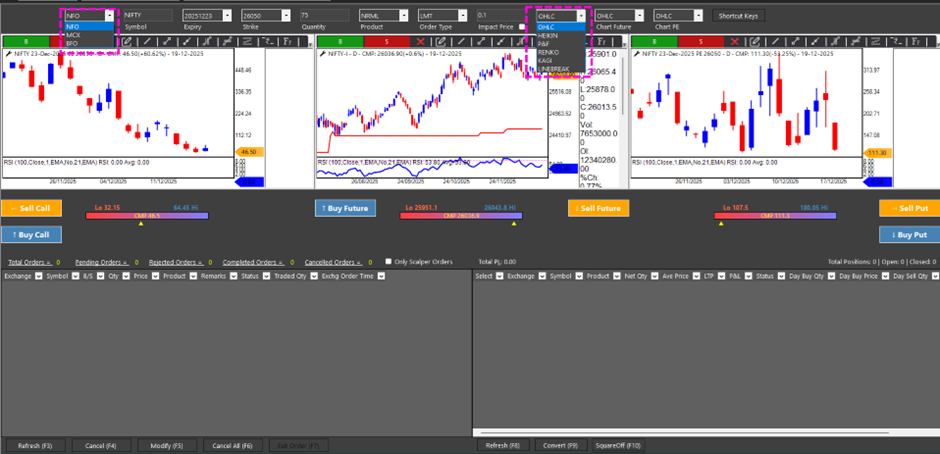
Exchange: NFO, BFO, or MCX
Instrument: Nifty, Bank Nifty, Sensex or other F&O Stocks.
Expiration: Once a week or once a month (weekly is the most common for scalping).
Strike Price: ATM by default, but you can change it easily.
You can set the quantity (multiple of lots) ahead of time. Set it once if you usually trade 750 units of Nifty (10lots assuming 75 is the lot size). If you want to lower it to 150 (2lots) later, it’s just one quick change. No problem or confusion.
Order Types with Built-In Protection:
D-Scalper lets you place both Market and Limit orders. Traders who use market orders need to be very aware of liquidity, especially for options. Price jumps that happen suddenly can hurt. This is when Impact Price becomes useful. It acts as a safety net.
If buyers are at ₹100 and you set an impact price of ₹1, your order won’t go through until ₹101. This turns aggressive market intent into a safe, controlled execution.
It’s easy to use, but very effective for managing risk.
Three Charts, One Screen, Full Clarity
The three-chart layout of D-Scalper is one of the most revolutionary things about it. Traders can see:
- Chart for call options
- Chart for futures
- Chart for put options
There can be differences between the charts.
1. OHLC on one
2. Point and Figure on another
3. Renko on the third
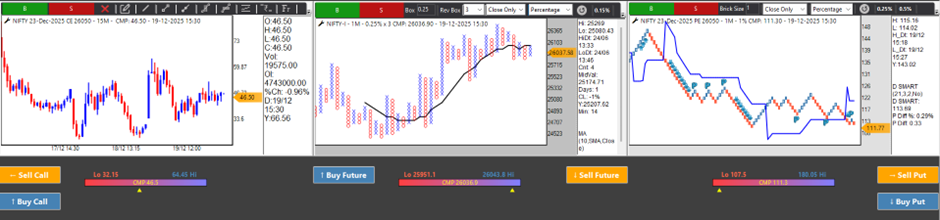
You can set all of the charts to the same time frame, like 1 minute, to get a clear view of price action without any noise. This kind of flexibility is rare and may be the first of its kind in the business.
Traders can add studies like moving averages, RSI, or any custom setup they like with a simple shortcut (Alt + A).
Execution with a mouse or keyboard is where D-Scalper really shines.
1. Buy Call / Sell Call
2. Buy Future and Sell Future
3. Buy Put and Sell Put

All of them can be done with a single click, and there are no confirmation pop-ups. The exchange gets orders right away. This takes discipline, but it pays off to be ready.
For traders who use keyboards a lot, shortcut keys make execution very quick:
Shortcut Keys for Keyboard
Buy CE = CLTR + Up Arrow
Sell CE = CLTR + Down Arrow
Buy PE = CLTR + Left Arrow
Sell PE = CLTR + Right Arrow
Futures Buy = Shift + Up Arrow
Futures Sell = Shift + Down Arrow
This design is respectful of old-school scalpers who like to use keyboards instead of mouse clicks.
Awareness and Position Control in Real Time
The bottom panel shows:
1. All orders
2. Orders that are still open, have been rejected, have been completed, or have been cancelled
3. Net positions (including trades made on other Definedge platforms)
You can even filter to see only D-Scalper orders in order book, which keeps scalping activity clean and free of distractions.
Even though partial exits are currently handled manually by changing the quantity, the workflow is still smooth and easy to understand.
More Than One-Minute Trades
D-Scalper is not just for trades that last a few seconds, even though that’s what the name suggests. Traders can hold positions for 15 to 30 minutes if the setup is right, using tools like Renko or Point & Figure charts. This workflow naturally includes trailing stops, whether they are set by hand or by an indicator.
D-Scalper is good for both aggressive scalpers and structured intraday traders.
What Comes Next
This is only the start. There are already plans for advanced strategies like one-click straddles, strangles, and multi-strike execution. The feature will soon be available on web and browser-based versions, so traders who use Apple devices will be able to use it too. TradePoint makes all of its features in-house, and user feedback is a big part of how updates are made. If a suggestion is useful and makes sense, it gets put into action right away.
If you wish to watch the video of D Scalper, click here